OVERVIEW

OVERVIEW

Redesigning Amazon Books: Enhancing Discovery and Exploration

Redesigning Amazon Books: Enhancing Discovery and Exploration

Amazon Books has long dominated the online book retail market, driven by its vast inventory and innovative technology such as Kindle. In 2023, Kindle accounted for approximately 47% of Amazon Books’ revenue, reinforcing Amazon’s strategic focus on the Kindle ecosystem. As a result, the Amazon Books web experience has been deprioritized, leaving it with an outdated user interface and an unreliable search and discovery experience. These gaps create friction for users browsing on the web and open opportunities for competitors to capture attention during the early stages of book discovery.

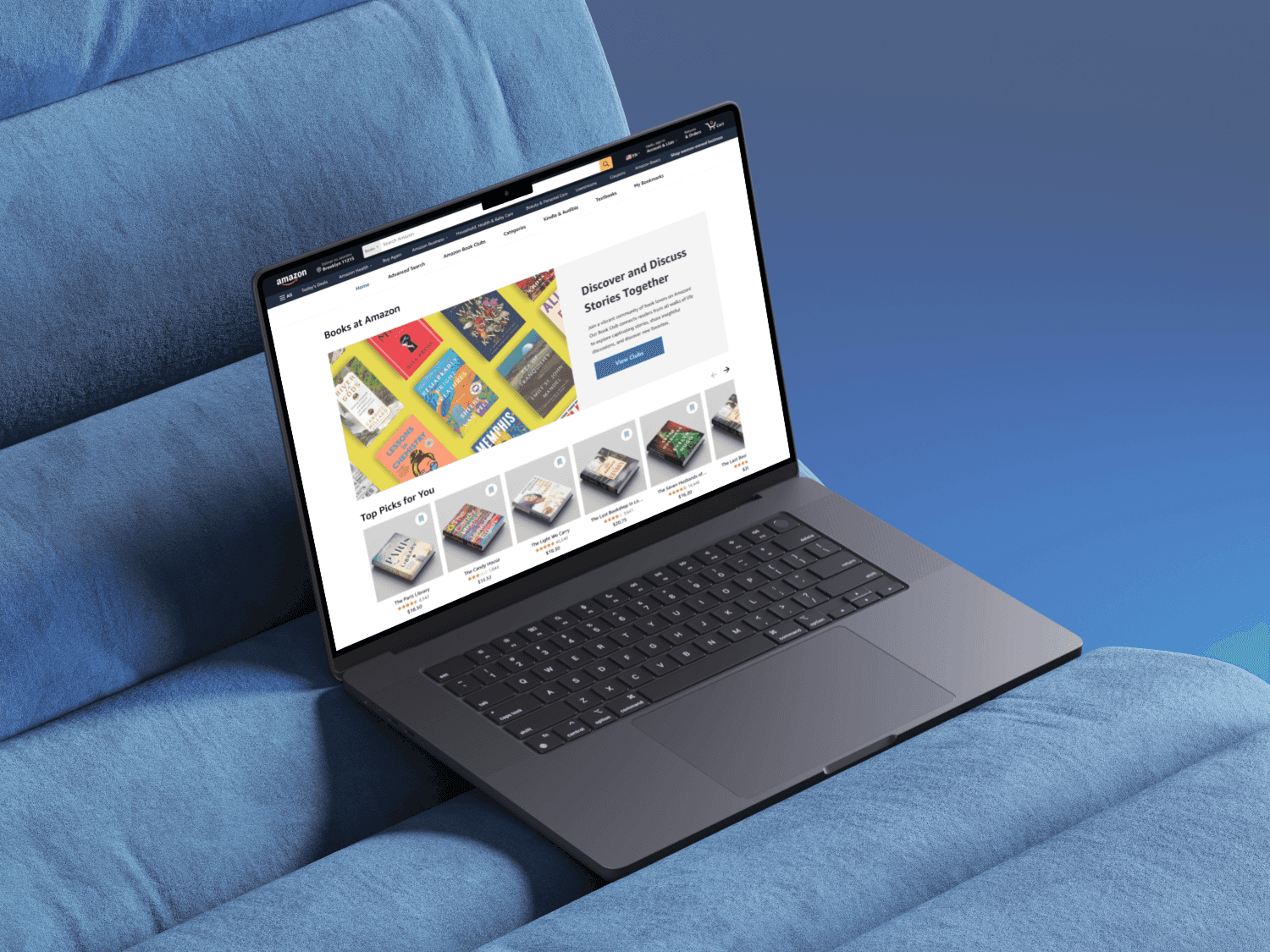
This project explores how improving Amazon Books’ web UI and revitalizing the discovery experience can better support users looking to browse, while modernizing the platform and reinforcing Amazon’s leadership in digital book retail.

Amazon Books has long dominated the online book retail market, driven by its vast inventory and innovative technology such as Kindle. In 2023, Kindle accounted for approximately 47% of Amazon Books’ revenue, reinforcing Amazon’s strategic focus on the Kindle ecosystem. As a result, the Amazon Books web experience has been deprioritized, leaving it with an outdated user interface and an unreliable search and discovery experience. These gaps create friction for users browsing on the web and open opportunities for competitors to capture attention during the early stages of book discovery.

This project explores how improving Amazon Books’ web UI and revitalizing the discovery experience can better support users looking to browse, while modernizing the platform and reinforcing Amazon’s leadership in digital book retail.

Project Duration

Project Duration

4 Weeks

4 Weeks

Role

Role

UX Designer, UX Researcher

UX Designer, UX Researcher

Tools

Tools

Figma, Google Forms

Figma, Google Forms

Team

Team

3 UX Designers

3 UX Designers

BACKGROUND

Opportunity

for Growth

Amazon Books is Amazon’s dedicated platform for buying and discovering books. Over the past few years, Amazon Books has reshaped the publishing industry through innovations like the Kindle. While the Kindle app has seen continuous updates and improvements, the web experience has not received the same attention.

For traditional readers who prefer print books, the web app remains an essential tool. The site works well for users who know exactly what they want, but offers little support for those who want to browse or discover new titles. As a result, many users experience cognitive overload when navigating its cluttered and outdated interface.

BACKGROUND

Opportunity

for Growth

Amazon Books is Amazon’s dedicated platform for buying and discovering books. Over the past few years, Amazon Books has reshaped the publishing industry through innovations like the Kindle. While the Kindle app has seen continuous updates and improvements, the web experience has not received the same attention.

For traditional readers who prefer print books, the web app remains an essential tool. The site works well for users who know exactly what they want, but offers little support for those who want to browse or discover new titles. As a result, many users experience cognitive overload when navigating its cluttered and outdated interface.

BACKGROUND

Opportunity

for Growth

Amazon Books is Amazon’s dedicated platform for buying and discovering books. Over the past few years, Amazon Books has reshaped the publishing industry through innovations like the Kindle. While the Kindle app has seen continuous updates and improvements, the web experience has not received the same attention.

For traditional readers who prefer print books, the web app remains an essential tool. The site works well for users who know exactly what they want, but offers little support for those who want to browse or discover new titles. As a result, many users experience cognitive overload when navigating its cluttered and outdated interface.

THE CHALLENGE

THE CHALLENGE

Cognitive Overload

Cognitive Overload

User are experiencing difficulty browsing due to it's outdated and cluttered interface.

User are experiencing difficulty browsing due to it's outdated and cluttered interface.

Discovery Friction

Discovery Friction

Users were experiencing cognitive overload due to an excess of information being displayed at once.

Users were experiencing cognitive overload due to an excess of information being displayed at once.

Lack of Intuitive Navigation

Lack of Intuitive Navigation

Casual browsers experience frustration navigating Amazon Book's vast library.

Casual browsers experience frustration navigating Amazon Book's vast library.

THE SOLUTION

THE SOLUTION

Create Intuitive Pathways

Create Intuitive Pathways

Provide clear, easy-to-follow navigation for users who don’t have a specific title in mind.

Provide clear, easy-to-follow navigation for users who don’t have a specific title in mind.

Support Exploration

Support Exploration

Enable users to effortlessly save, organize, and revisit books of interest, encouraging discovery.

Enable users to effortlessly save, organize, and revisit books of interest, encouraging discovery.

Reduce Cognitive Load

Reduce Cognitive Load

Streamline the web interface to make browsing intuitive and easy to navigate.

Streamline the web interface to make browsing intuitive and easy to navigate.

Design Process

Design Process

1

Empathize

Empathize

Conducted a competitive analysis, user survey, and user interviews.


Conducted a competitive analysis, user survey, and user interviews.


2

Define

Define

Synthesized research findings into key insights, a problem statement, and a user journey map.


Synthesized research findings into key insights, a problem statement, and a user journey map.


3

Ideate

Ideate

Generated “How Might We” questions and brainstormed design solutions.


Generated “How Might We” questions and brainstormed design solutions.


4

Prototype

Prototype

Created low and high-fidelity wireframes to visualize potential solutions.


Created low and high-fidelity wireframes to visualize potential solutions.


5

Test

Test

Conducted usability testing with target users to gather feedback on the prototypes.


Conducted usability testing with target users to gather feedback on the prototypes.


USER RESEARCH

USER RESEARCH

Understanding

the User

Understanding

the User

We conducted a series of studies to better understand how users navigate Amazon Books, focusing on their behaviors, pain points and unmet needs. Initially, we analyzed features and flows from other book platforms to get an idea of best practices. We surveyed 50 Amazon Book users to learn about our users and their buying habits. We conducted 5 user interviews to dive deeper into user pain points. By combining quantitative and qualitative methods, we were able to validate user behaviors at scale while uncovering deeper insights into user motivations and frustrations.

We conducted a series of studies to better understand how users navigate Amazon Books, focusing on their behaviors, pain points and unmet needs. Initially, we analyzed features and flows from other book platforms to get an idea of best practices. We surveyed 50 Amazon Book users to learn about our users and their buying habits. We conducted 5 user interviews to dive deeper into user pain points. By combining quantitative and qualitative methods, we were able to validate user behaviors at scale while uncovering deeper insights into user motivations and frustrations.

COMPETITIVE ANALYSIS

Market Opportunities and Gaps
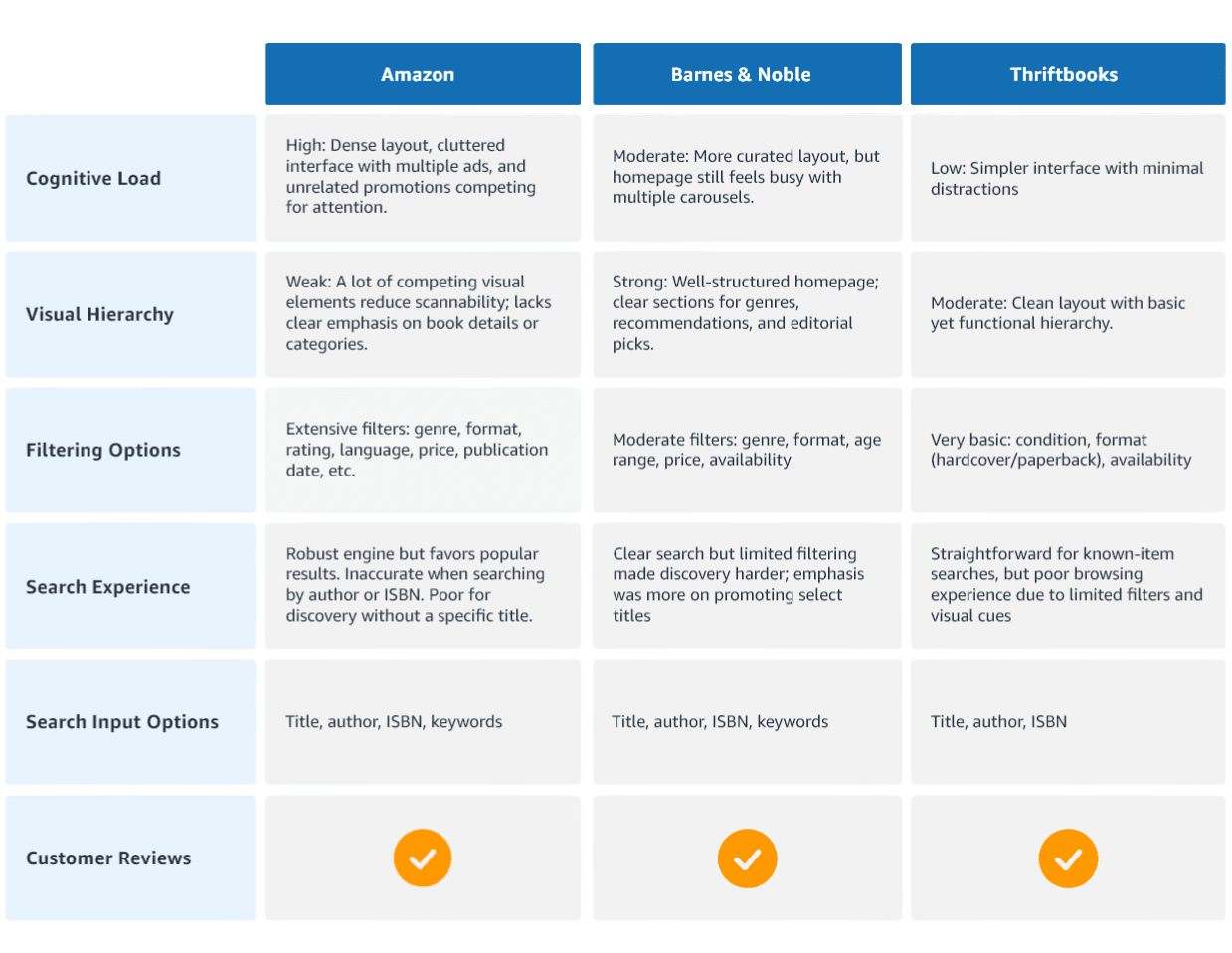
To identify opportunities for enhancement, I conducted a competitive analysis. Our research revealed gaps such as the need for a more accurate search engine, simplified navigation, and a stronger visual hierarchy, to support easier browsing and discovery.

To identify opportunities for enhancement, I conducted a competitive analysis. Our research revealed gaps such as the need for a more accurate search engine, simplified navigation, and a stronger visual hierarchy, to support easier browsing and discovery.

USER SURVEY

USER SURVEY

Analyzing User Behavior

Analyzing User Behavior

Question:

Question:

Where do you often purchase books?

Where do you often purchase books?

Findings:

Findings:

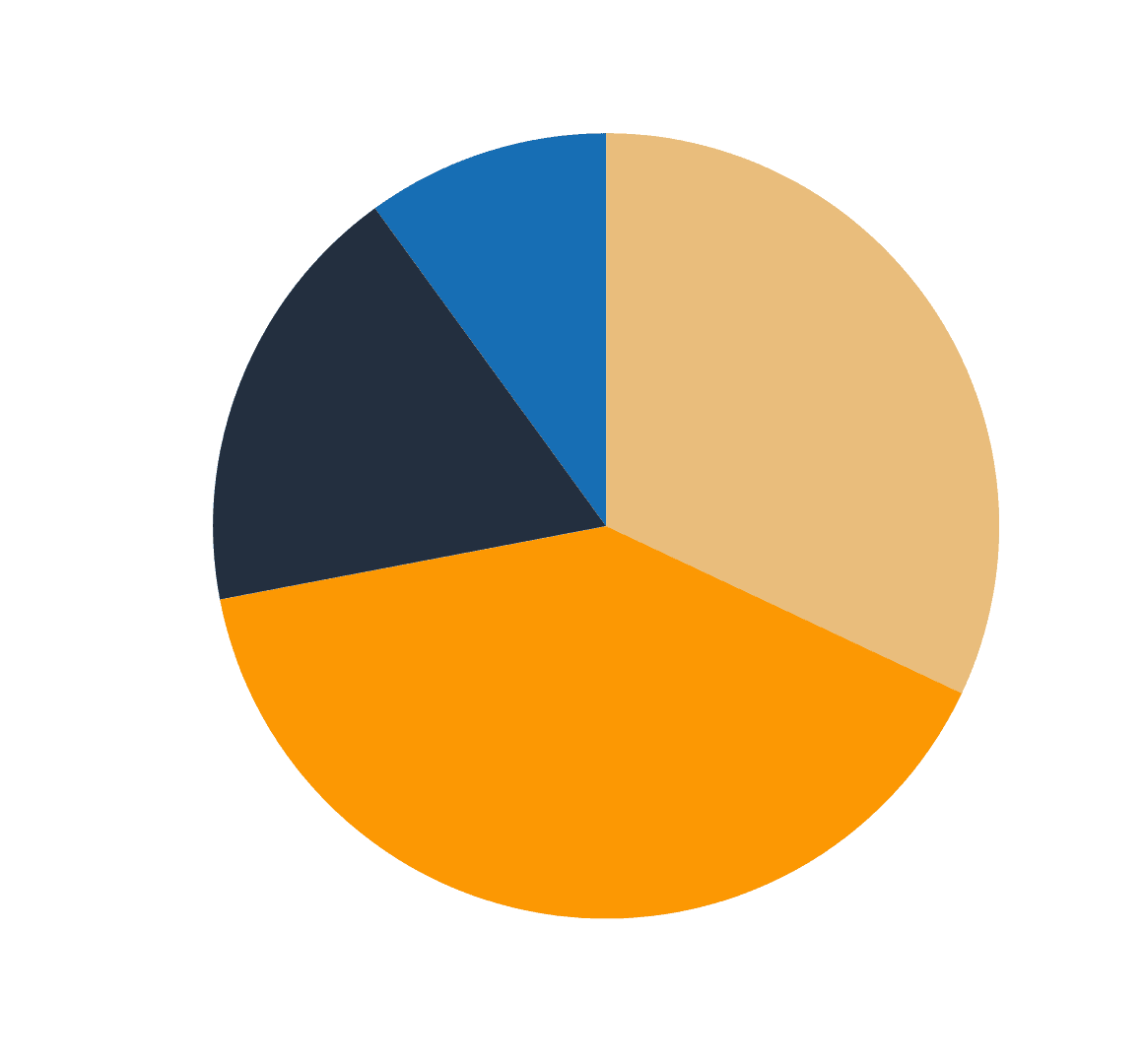
40%

40%

of the users preferred purchasing books online.

of the users preferred purchasing books online.

What I Noticed:

What I Noticed:

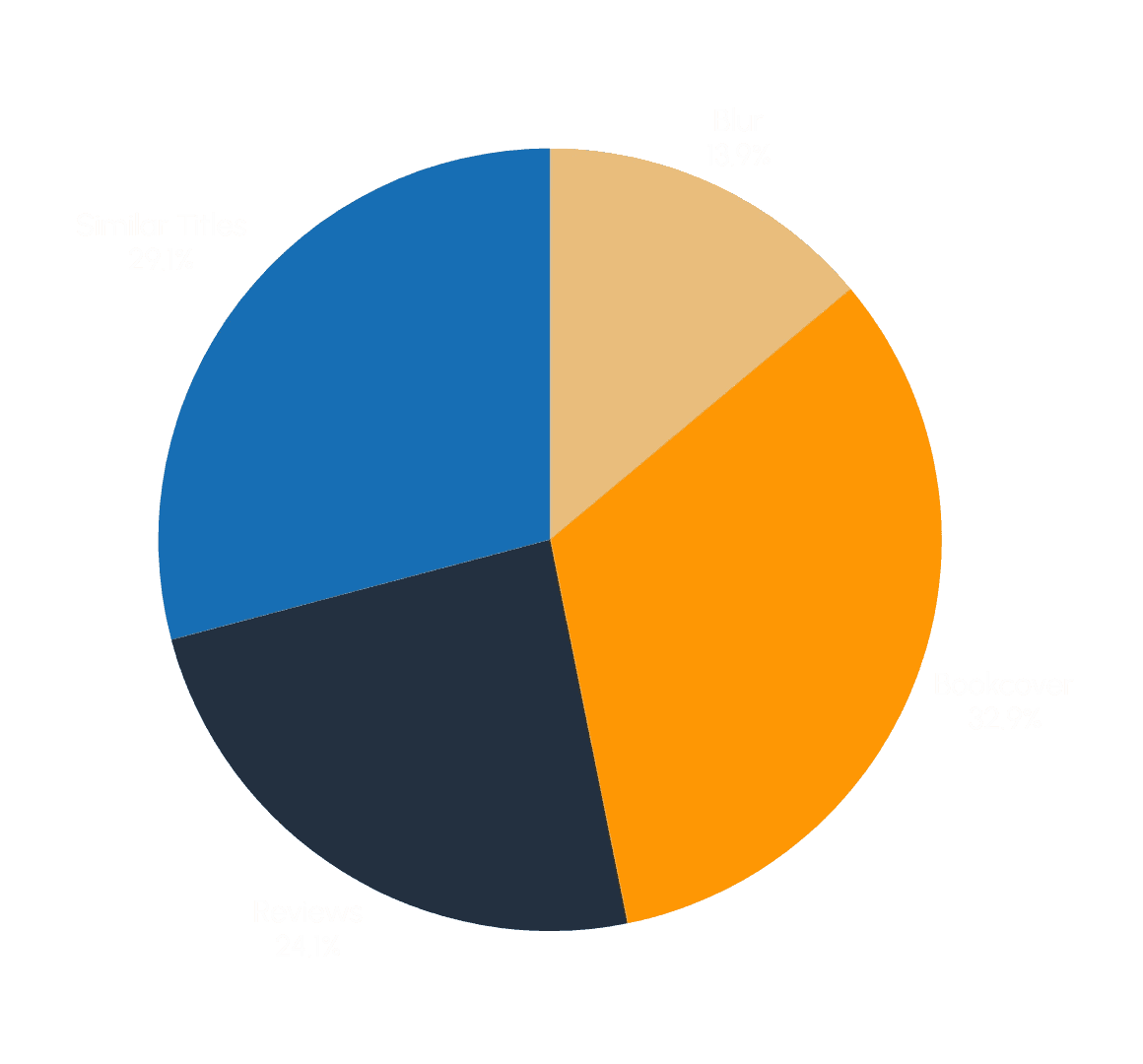
We noticed the majority of users from the survey tend to shop online. To better understand their purchasing behavior, I examined recent market trends and platform constraints. I found Amazon sold 36.7 million more print books than digital titles, in 2023. Then I discovered physical books cannot be purchased through the Kindle app, while the web version supports both digital and print purchases.

We noticed the majority of users from the survey tend to shop online. To better understand their purchasing behavior, I examined recent market trends and platform constraints. I found Amazon sold 36.7 million more print books than digital titles, in 2023. Then I discovered physical books cannot be purchased through the Kindle app, while the web version supports both digital and print purchases.

Question:

What information is most important to you when deciding to purchase a book?

Findings:

47%

of the users reported difficulty finding book specifications when asked about their pain points.

What I Noticed:

That was surprising, because in my competitive analysis I discovered that Amazon actually provides more detailed specs than its competitors. So, why couldn’t users find them? As I dug deeper, a few patterns stood out: the interface felt outdated, the search was weaker than competitors, and most importantly there was simply too much information shown at once. Instead of helping, the abundance of details created cognitive overload, making it hard for users to focus on what mattered. This revealed an important opportunity: it wasn’t about adding more information, but about presenting the right information, in the right way. Streamlining book specifications became a key design priority to reduce friction and make product discovery easier.
Question:

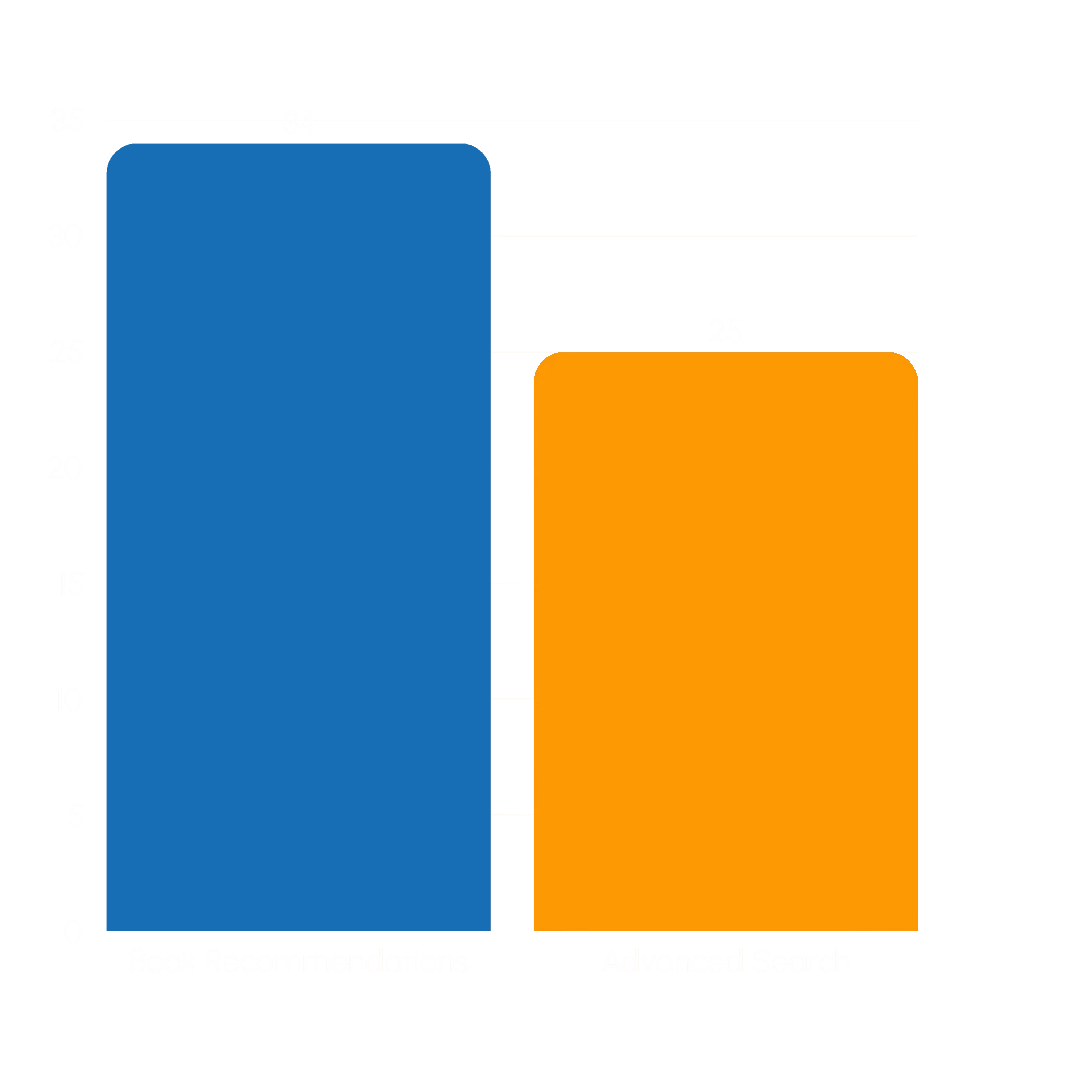
Which features on Amazon Books do you feel could be improved?

Findings:

68%

of the users selected

book recommendations

50%

of the users selected

the advanced search

What I Noticed:

The data reveals a clear pattern: users aren’t just looking for more features; they’re looking for smarter ways to navigate Amazon’s massive book library. Their interest in both recommendations and advanced search shows that users want guided discovery, not endless scrolling. They need tools that help them narrow down options.

USER INTERVIEWS

Opportunities for Growth

While conducting user interviews, 80% of the users found Amazon's browsing experience mentally taxing. Although Amazon's massive inventory is a key strength, navigating such a large collection of books can be overwhelming for some users. Others expressed frustration with the site's unreliable advance search feature, noting filtering by author or publication date often yields inaccurate and irrelevant results, further discouraging discovery. Overall users find Amazon Books most efficient when they know exactly what they want, but not a platform for exploration.

Quotes From Our Users

“Amazon Books gives us more information than we need.” - user

“I don’t browse for books on Amazon unless I already know what book I want.” - user

"I get frustrated using the advanced search feature. Searching for a book by author and publication date is inaccurate.” - user
KEY INSIGHTS

What the User's Want

As the research unfolded, a clear narrative emerged. Users came to Amazon with purpose ready to buy a book they already had in mind. But the moment they tried to wander, browse, or simply look for inspiration, the experience shifted. Instead of feeling guided, they felt lost in a maze of endless options with little direction. What users described wasn’t just frustration, it was a longing for a smoother, more intuitive way to discover their next read.

Users Need a More Focused

Amazon Books Experience

Users want the flexibility to purchase both print and digital books, so we prioritized the web experience as the primary focus of our design strategy.

Users Need More Accurate

and Supportive Search Tools

Users want more control over their searches to quickly find relevant books. Amazon Book’s existing search experience doesn’t meet that need, creating frustration.

Users Need a Simplified,

Less Cluttered Interface

Users want a simplified layout that reduces visual clutter and highlights the most relevant information. A cleaner interface would help minimize cognitive overload.

USER PERSONA

Who We're Designing For

Using insights gathered from user interviews and behavior patterns, I developed three representative personas to capture the range of user needs and motivations. One of these personas is Hana Kim, she represents users who want quick, intuitive ways to discover new books.

Background

Full-time college student and leader of campus book club

Passionate about fiction books

Buys textbooks occasionally

Goals

Stay updated on trending or popular titles among her peers

Discover books to share with her book club

Balance academic reading with leisure reading

Behaviors

Browses online platforms and reviews before purchasing

Often shops through online retailers and buys in bulk

Participates in discussions that influence her future book choices

Pain Points

Difficulty finding books that are interesting for her book club and appropriate for school.

Needs to find books quickly due to a tight schedule.

Overwhelmed by too many irrelevant search results,

PROBLEM STATEMENT

When Browsing

Becomes a Burden

User research revealed that Amazon's book shopping experience can lead to cognitive overload, especially for users who don’t have a specific title in mind. While the platform performs well for task-oriented users who know exactly what they’re looking for, it lacks intuitive pathways for casual browsers or indecisive shoppers. This creates a frustrating experience when trying to explore Amazon’s vast library. Our goal is to better support exploratory behavior by identifying and addressing the design barriers that prevent meaningful book discovery.

HOW MIGHT WE

Centering User Discovery

As I dug deeper into the research, a pattern emerged. Users weren’t just searching for books, they were searching for direction. Many entered Amazon with curiosity, only to lose their way in the noise of endless choices. To reimagine this experience, I turned their struggles into the following guiding questions:

How Might We …

make advanced search feel intuitive and valuable so users naturally incorporate it into their book discovery journey?

How Might We …

simplify the browsing experience so users feel in control as they explore books?

How Might We …

present essential book details in a way that supports users’ browsing flow without overwhelming them with clutter?

How Might We …

make book exploration feel more personalized to give users a clearer sense of direction?

LOW-FIDELITY WIREFRAMES

Concept Development

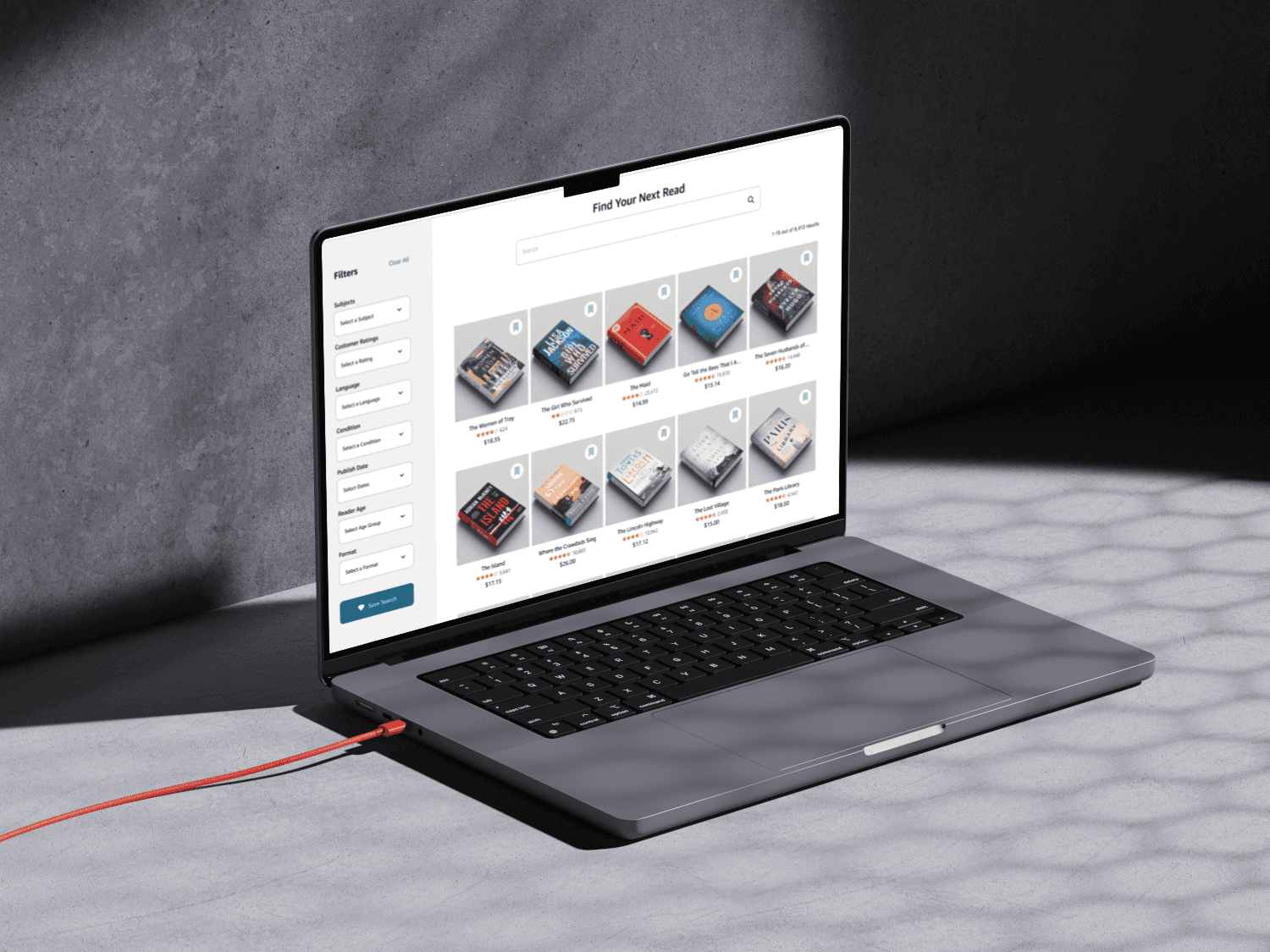
To address the core user challenges uncovered earlier, I moved into the ideation phase and explored a wide range of possible solutions. Using the Crazy 8s brainstorming method, I rapidly sketched multiple design concepts focused on improving book discovery, simplifying navigation, and reducing cognitive overload. The following low-fidelity wireframes represent the concepts that best addressed the user’s core pain points and were selected for further exploration.
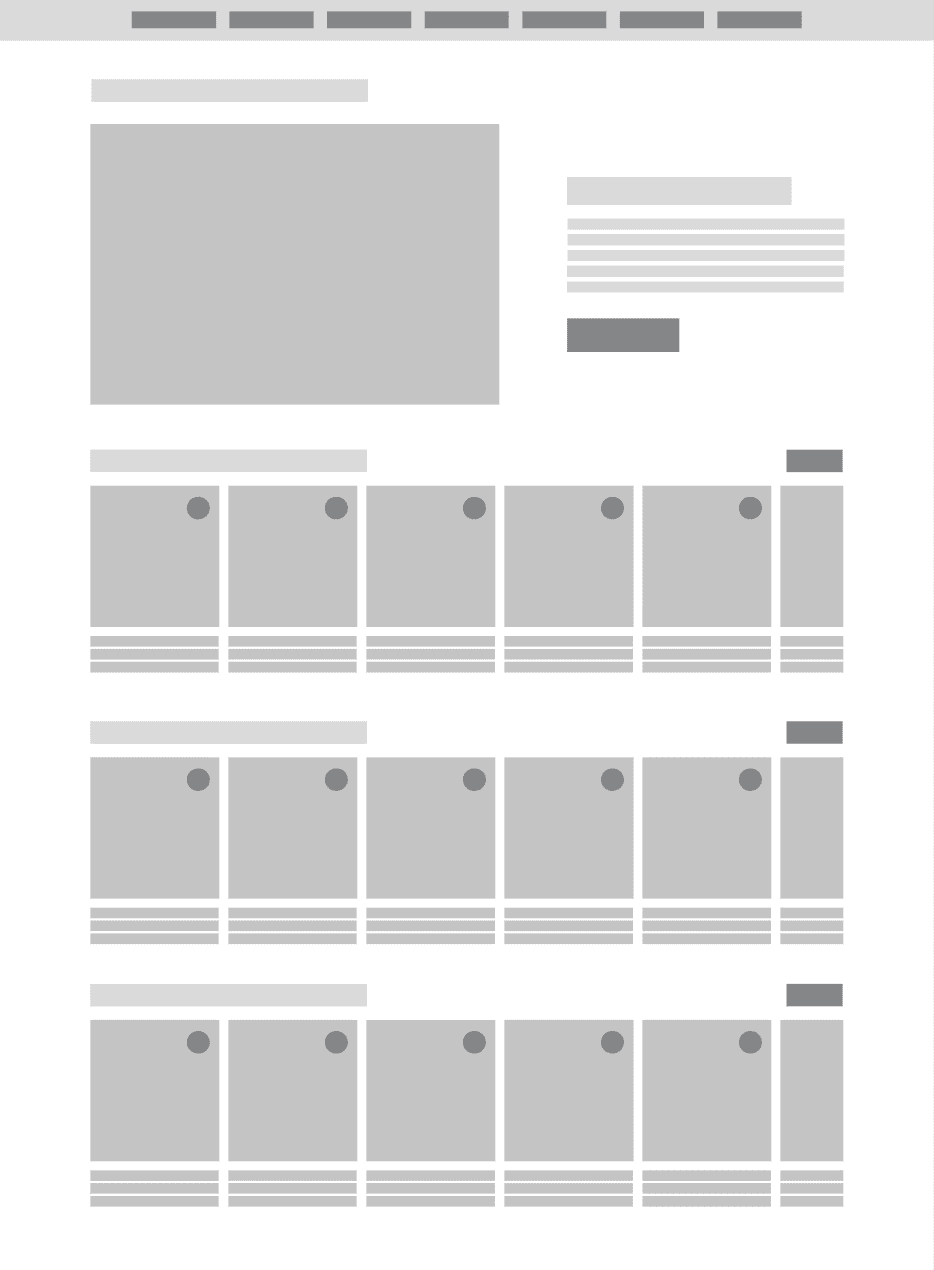
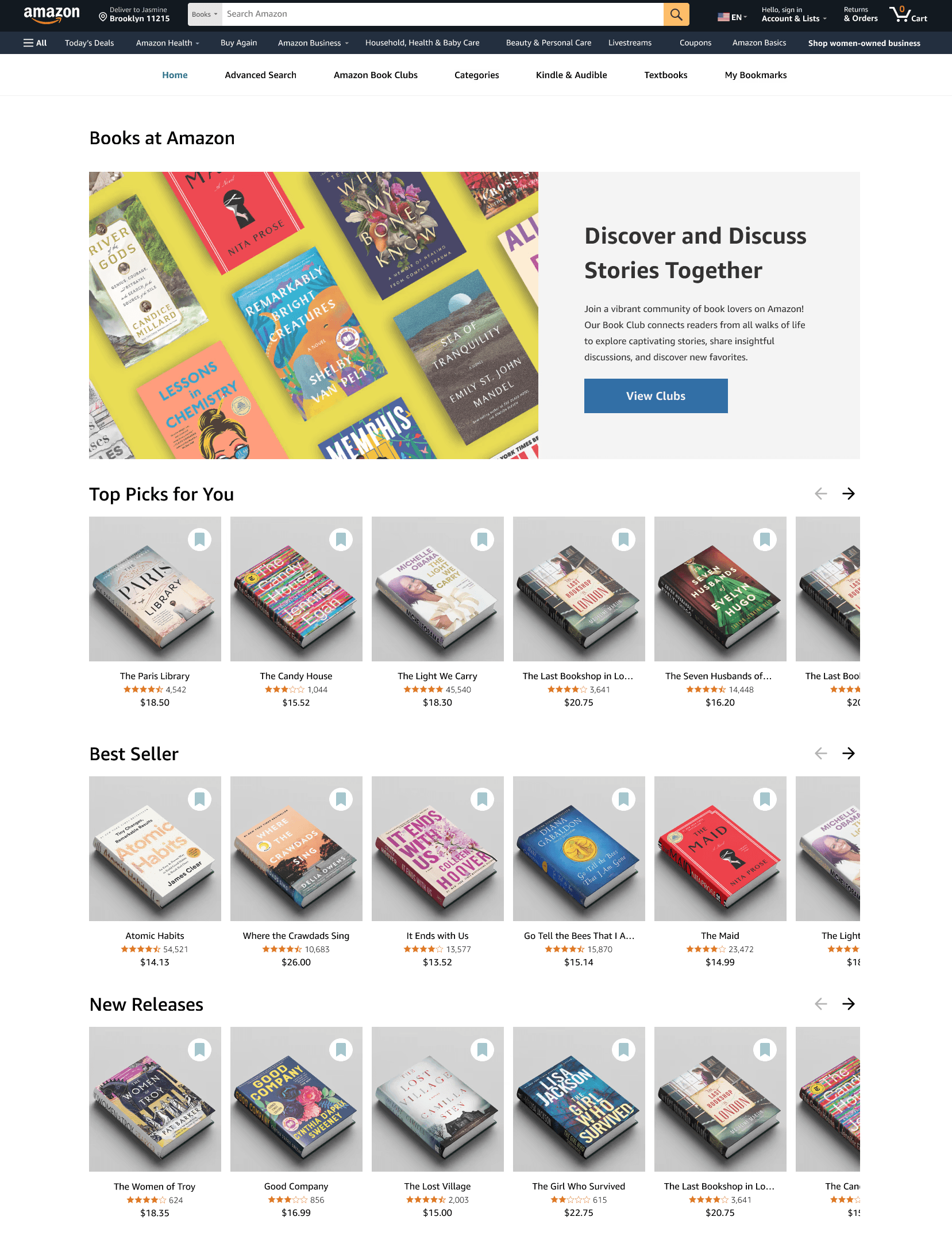
Home Page

A simplified interface that removes the cluttered sidebar and redundant tabs, creating a cleaner, more inviting entry point for book discovery. This streamlined layout helps users focus on the most relevant content and encourages exploration.
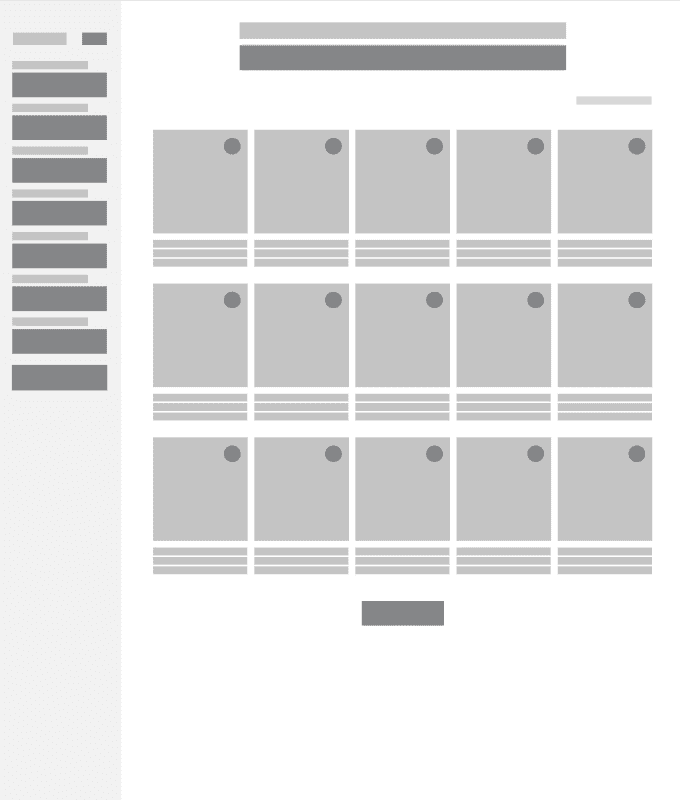
Advance Search Tab

An enhanced search experience with more accurate filtering options that help users confidently explore Amazon Books’ vast library. The improved filters make it easier to narrow down results, surface relevant titles, and support exploratory browsing without overwhelming the user.

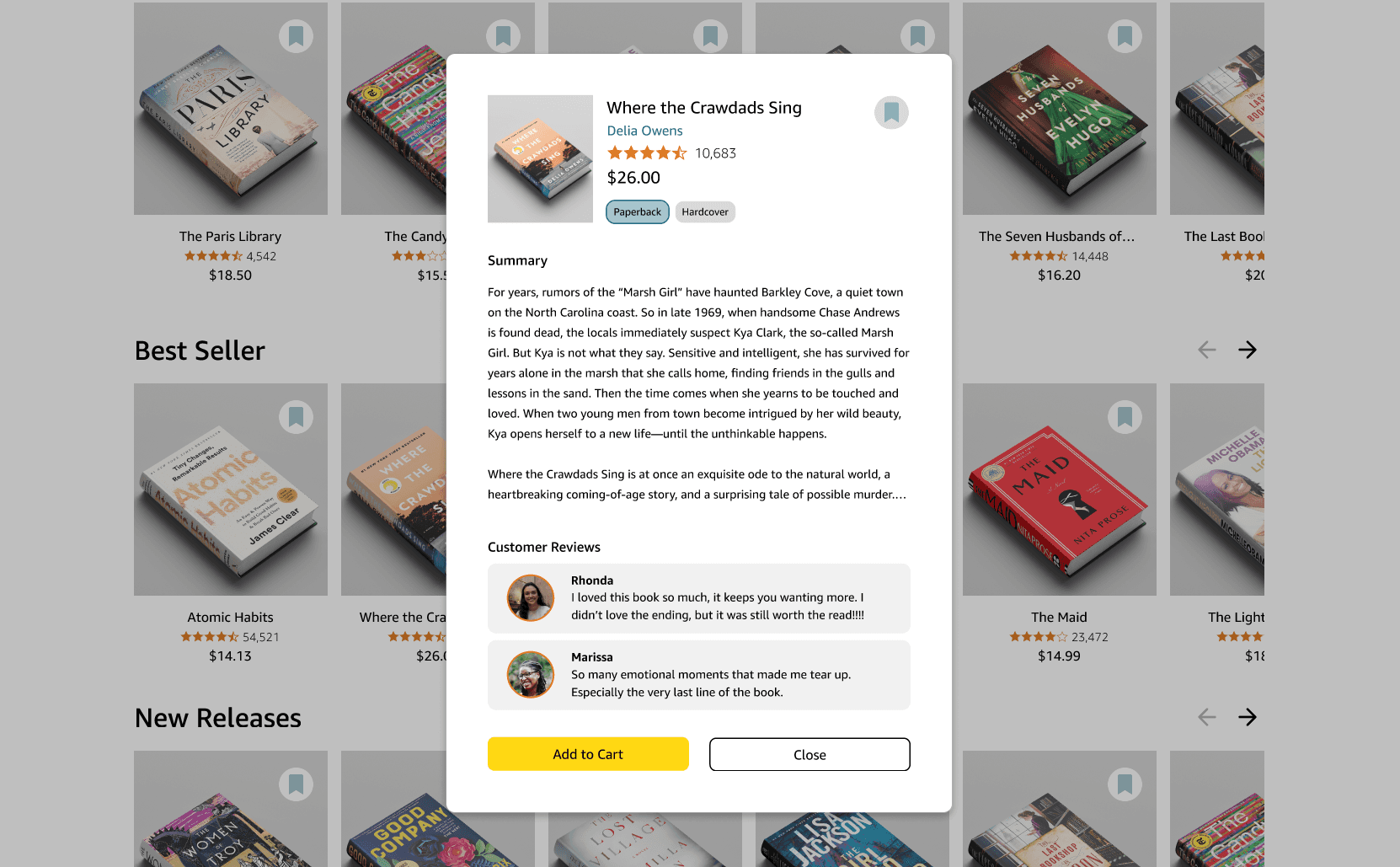
Book Detail Modal:

A quick-view modal that displays the most relevant book information, allowing users to learn more without navigating away from their current page. This helps save time, reduce disruptions, and support smoother browsing.

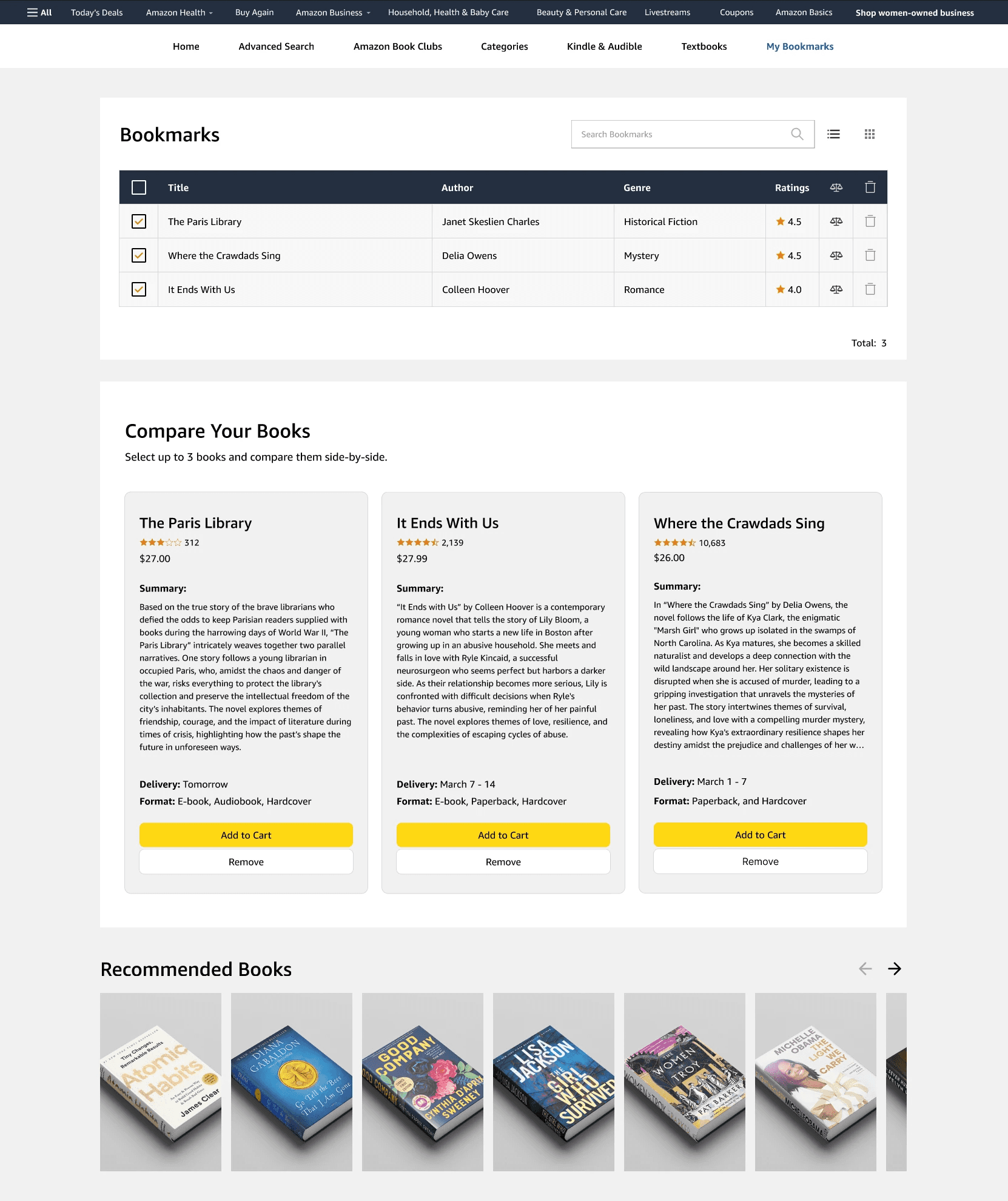
Bookmarks Tab

A dedicated bookmarks tab where users can save and organize books they’re interested in. While browsing, users can quickly bookmark titles and later compare up to three books side by side. This supports casual exploration, helps users keep track of options, and makes it easier to defer decisions without losing their place.

HIGH-FIDELITY WIREFRAMES

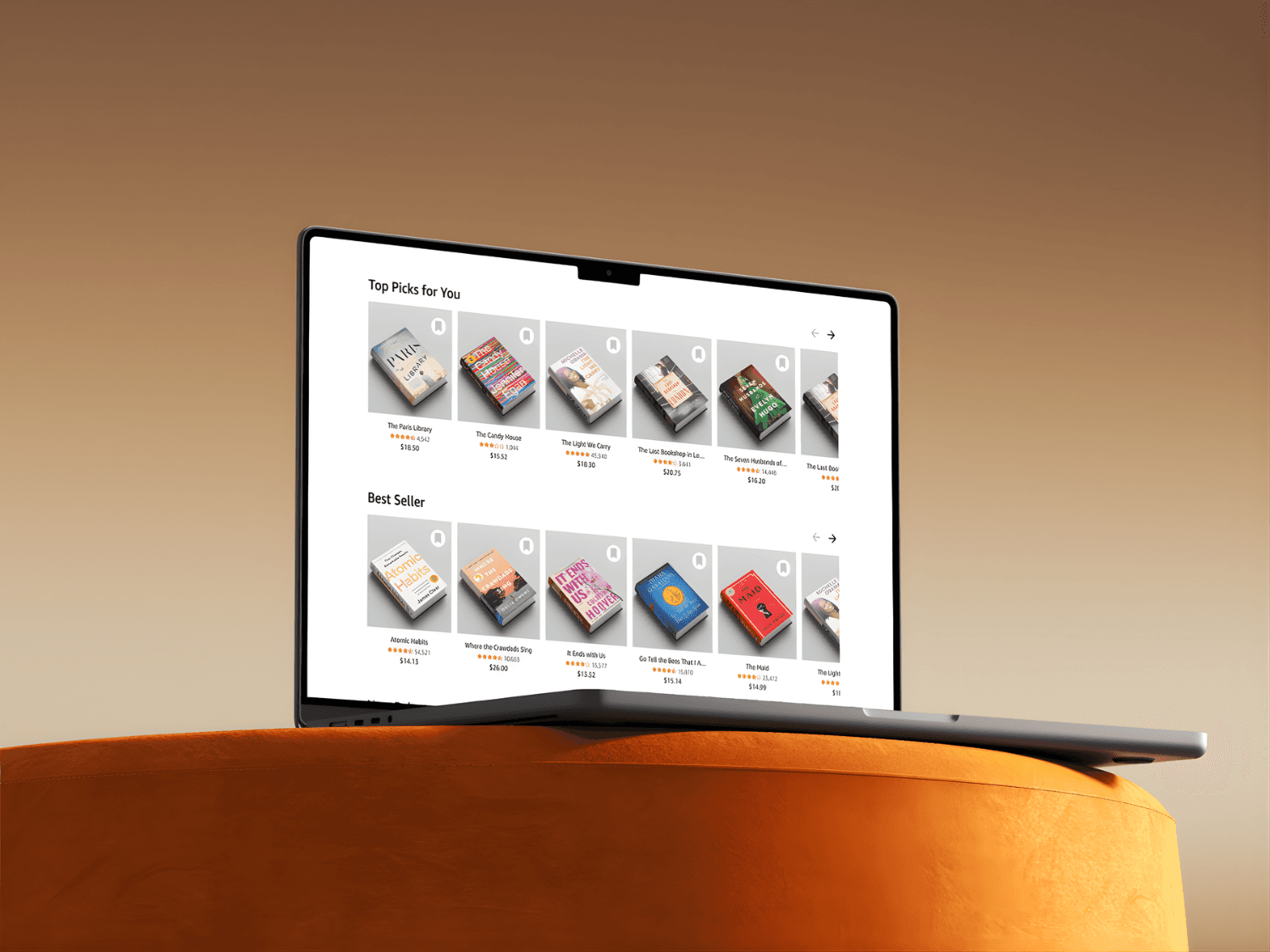
Final Product
CONCLUSION

Final Thoughts

Overall, users responded positively to the redesign and expressed clear satisfaction with the improved browsing flow, clearer book details, and more intuitive discovery pathways. The new structure reduced feelings of overwhelm and helped readers—especially casual or indecisive ones—navigate Amazon’s large book catalog with more confidence.

The primary issue uncovered during testing involved accessibility challenges within the modal experience. Some users relying on assistive tools had difficulty navigating and closing the modal smoothly. This feedback highlighted the importance of ensuring that all interactive components—especially overlays—are fully accessible and keyboard-friendly.


Moving forward, addressing these accessibility gaps will not only enhance usability but also ensure the experience is inclusive for all readers. Despite this improvement area, the redesign successfully met its goal: supporting exploratory behavior and making book discovery more meaningful and enjoyable.